

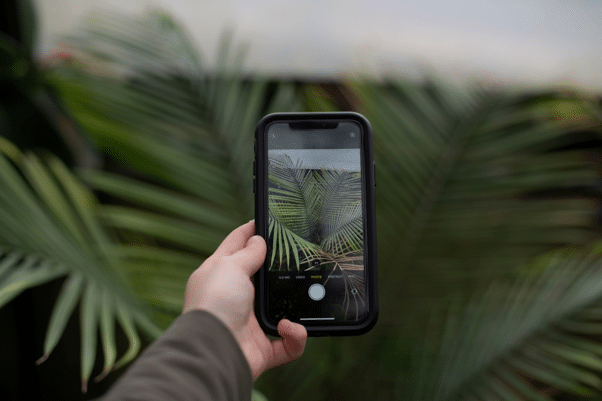
You pass by a plant you like and don’t know its name. Luckily, your phone can help you identify it in seconds. A clear photo is often enough to name a species. So, how to use a camera to identify plants?
To use your camera to identify plants, take a photo of a single leaf, flower, or stem in natural light. Then, upload it to your phone’s visual lookup, use image search, or open a specialized identification app. It’s very simple.
Below, we will explain how each method works and show you several tips to achieve the most accurate identification results.
1. Apple Visual Look Up
Apple Visual Look Up comes standard on the iPhone. It scans photos and suggests matching species based on online reference data. You don’t need a separate app — this makes it easy to identify a plant with an iPhone during a walk.
Follow these steps to start identification:
- Open the camera and center a single leaf, flower, or fruit in the frame.
- Take a clear photo in daylight — avoid fingers, shadows, or other species behind the subject.
- Open the image in Photos and look for the information icon with small sparkles.
- Tap the icon, then select “Look Up Plant” from the menu below the photo.
- Browse the suggested species, open source pages, and compare leaf shape, color, and growth pattern.
- Save the result only after two or more visible characteristics match your plant.
The tool is free and already installed on your phone. It may miss rare species or provide limited information about care, watering, and lighting requirements.
2. Google Image Search
You can use Google to identify plant species from almost any phone. Google Lens performs a reverse image search against Google’s index. The tool compares your photo with images from websites and related pages. Here is how it works in practice:
- Open the Google app, Google Photos, or Chrome and tap the Lens camera icon.
- Take a new photo or select a clear image of the plant from your gallery.
- Crop the frame around a single leaf, flower, fruit, or stem to remove unnecessary background details.
- Scroll through photos with visual matches and open results that show the same species structure.
- Compare multiple pages to identify a plant by photo and check the scientific name.
- Repeat the search with a different photo if the first result is not clear.
Google Lens works on many devices and uses a wide range of web sources. However, results may be wrong, outdated, or based on incorrectly labeled photos from fake websites.
3. Dedicated Plant ID Apps
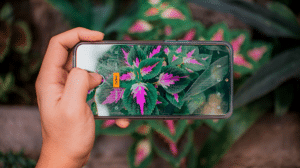
If you still do not know how to figure out what plant I have after trying the first two methods, use a dedicated identification app. These tools rely on their own botanical databases. That is why they often give better results than general image search tools.
One good example is the Botan App. It can recognize all plants you know and many rare species as well. This plant identifier by picture includes a database of more than 30,000 species, including trees and mosses.
It uses photo recognition for identification and AI tools to detect common diseases and provide care tips. Its accuracy reaches up to 98%. Most dedicated apps work similarly:
- Open the app and allow camera access.
- Take a clear photo or upload it directly from your phone gallery.
- Wait a few seconds while the app scans the image.
- Review the suggested species and check the details.
- Save the result or make one scan if you need.
Many apps also include care reminders, a light meter, tools for identifying insects, pests and diseases, and even a live chat with an expert botanist.

Simple Photography Guidelines
Still asking yourself what kind of plant this is? In order to get an accurate identification result, you first need a good photo. The image should show the parts that help the system identify the species. Include leaves, flowers, stems, or fruits, if present.
Keep the plant in focus and remove unnecessary background details. Here is how to identify a plant most accurately:
- Photograph in natural daylight.
- Hold the camera before taking the photo.
- Fill most of the frame with the plant.
- Photograph the entire plant as well as close-ups of the leaves.
- Include flowers, fruit, or bark in the frame, if possible.
- Avoid shadows that obscure important parts of the species.
- If possible, remove other plants from the frame.
- Take several photos from different angles.
These small steps improve recognition and reduce wrong matches. Higher-quality photos allow you to get faster and more accurate results.
Plant Identification Tools Compared
Each method has its own characteristics. Some are good for quick checks, while others provide more detailed care data and additional information on insects, pests, and plant diseases. Compare them to choose the best solution and identify plant by photo in the most convenient way for you.
| Identification Method | Toxicity & Safety Flags | Level of Detail | Best Scouting Scenario | Key Advantage |
| System Visual Look Up | None (Wikipedia only) | Low (Wiki snippets) | City parks and home gardens | Built into supported devices with no setup |
| Google Image Search | None (Web images) | Low (Linked websites) | Fast online lookups anywhere | Large web index and broad image coverage |
| Dedicated Plant ID Apps | High (Safety alerts and care tips) | High (Plant profiles, history, and logs) | Hiking, forests, and rare outdoor searches | AI recognition with a dedicated database |
Conclusion
Your phone can identify many plants in just a few steps. Apple Visual Look Up is good for quick checks on iOS devices. Google Lens provides a wide range of online results on virtually any phone.
Dedicated apps offer the most comprehensive functionality and provide greater accuracy, care details, and safety information. Take clear photos and compare results when needed. This simple habit will help you avoid mistakes and identify plants outdoors with greater confidence.
Per our affiliate disclosure, we may earn revenue from the products available on this page. To learn more about how we test gear, click here.